Create Your Own Security Advisories
A security advisory in DevGuard lets you author, score and publish your own vulnerability reports for a repository. Unlike the VEX documents DevGuard generates automatically from scanner findings, a security advisory is written by a human — it is the vendor statement you issue when your software is affected by a vulnerability and you want to communicate it to your users in a standardized way.
Every advisory you publish is served through DevGuard's CSAF provider tree, so downstream consumers receive it in the same machine-readable format as any other advisory in the ecosystem.
Prerequisites
Before you create a security advisory, make sure you have:
- A repository (asset) with at least one ref: Advisories are scoped to a specific repository. The menu entry only appears once a ref exists.
- Admin permissions: Only organization or repository admins can create, edit, publish, withdraw or delete an advisory. Everyone with read access can view published advisories.
- The vulnerability details at hand: A title and description, the affected package(s) with their affected and patched version ranges, and — ideally — a CVSS vector for scoring.
- Public vulnerability data enabled (for publishing): To distribute advisories through the CSAF feed, the repository must have vulnerability sharing turned on. See CSAF Reports in DevGuard.
When to Use a Security Advisory
DevGuard produces two kinds of vulnerability statements. Understanding the difference helps you pick the right tool:
| Auto-generated VEX | Security advisory | |
|---|---|---|
| Source | Derived from detected dependency vulnerabilities, with affectedness reviewed and confirmed by a security researcher in your team | Manually authored by you |
| Answers | "Am I affected by someone else's CVE?" | "My product has a vulnerability — here it is" |
| Content | Product status per detected CVE | Title, description, CVSS, affected packages |
| Identifier | The upstream CVE ID | A DevGuard ID DGSA-<year>-<id> |
| Published as | csaf_vex document | csaf_security_advisory document |
Both are published side by side through the same CSAF endpoints, giving consumers one unified feed that covers machine-detected CVEs and your human-authored advisories.
The Security Advisory Lifecycle
A security advisory moves through three visibility states. It always starts as a private draft that you can freely edit, and once it is correct you publish it. A published advisory is public and immutable — if it later needs to be revoked you withdraw it, which keeps it visible but marks it as no longer valid.
| State | Meaning | Available actions |
|---|---|---|
| Draft | Private, only visible inside DevGuard, fully editable | Change, Publish, Delete |
| Public | Published to the CSAF feed, no longer editable | Withdraw |
| Withdrawn | Stays public but is flagged as revoked and locked | — |
Where to Find Security Advisories
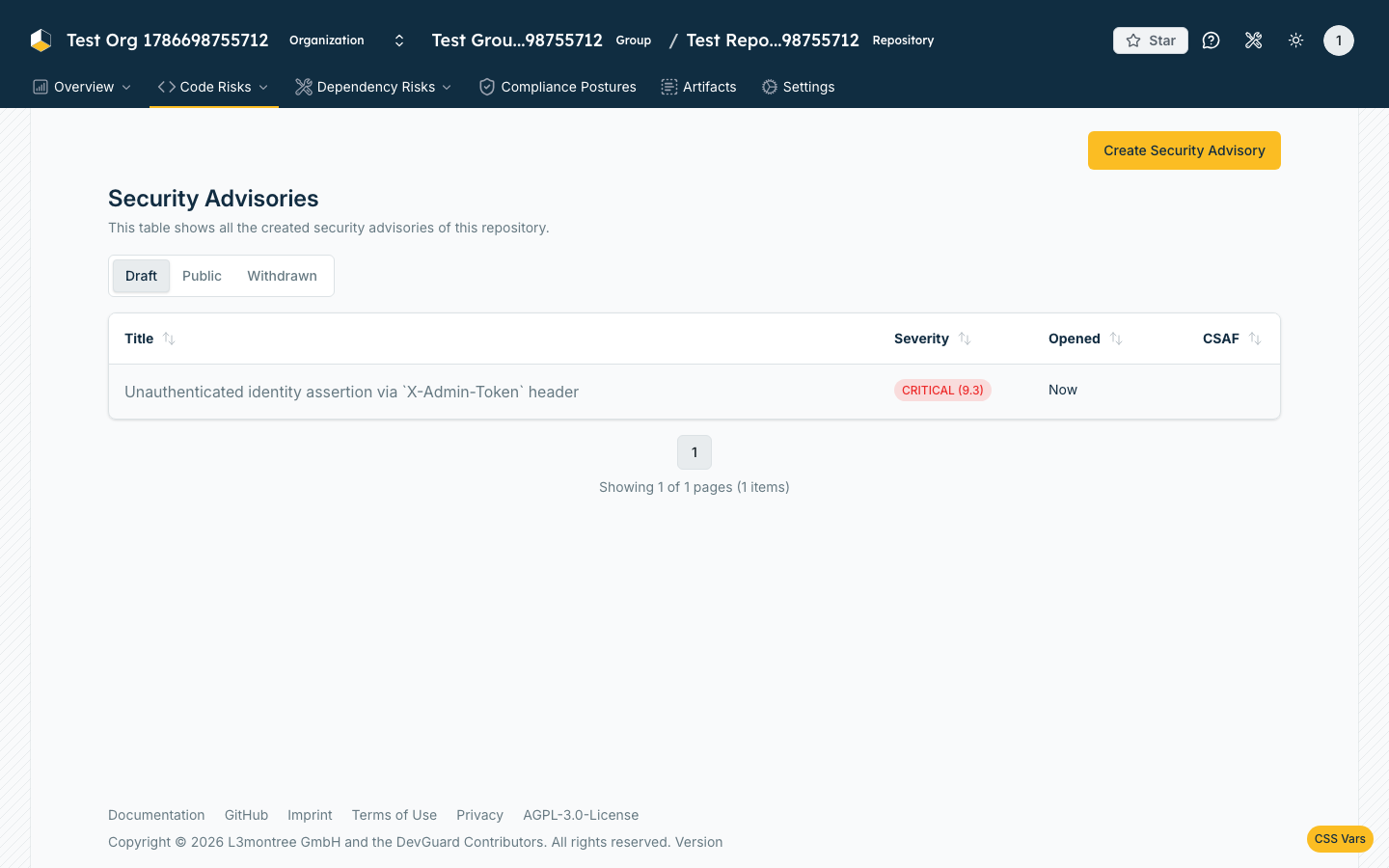
Navigate to your repository and open the Security Advisory entry in the asset side menu (shield icon). It sits in the Code-Risks dropdown menu.
This opens the advisory list for the current repository and ref. The list is organized into Draft, Public and Withdrawn tabs, and — as an admin — you get a Create Security Advisory button in the top-right corner. Each row shows the advisory title and its CVSS severity.
Create a Security Advisory
Click Create Security Advisory to open the creation dialog. The dialog guides you through three steps.
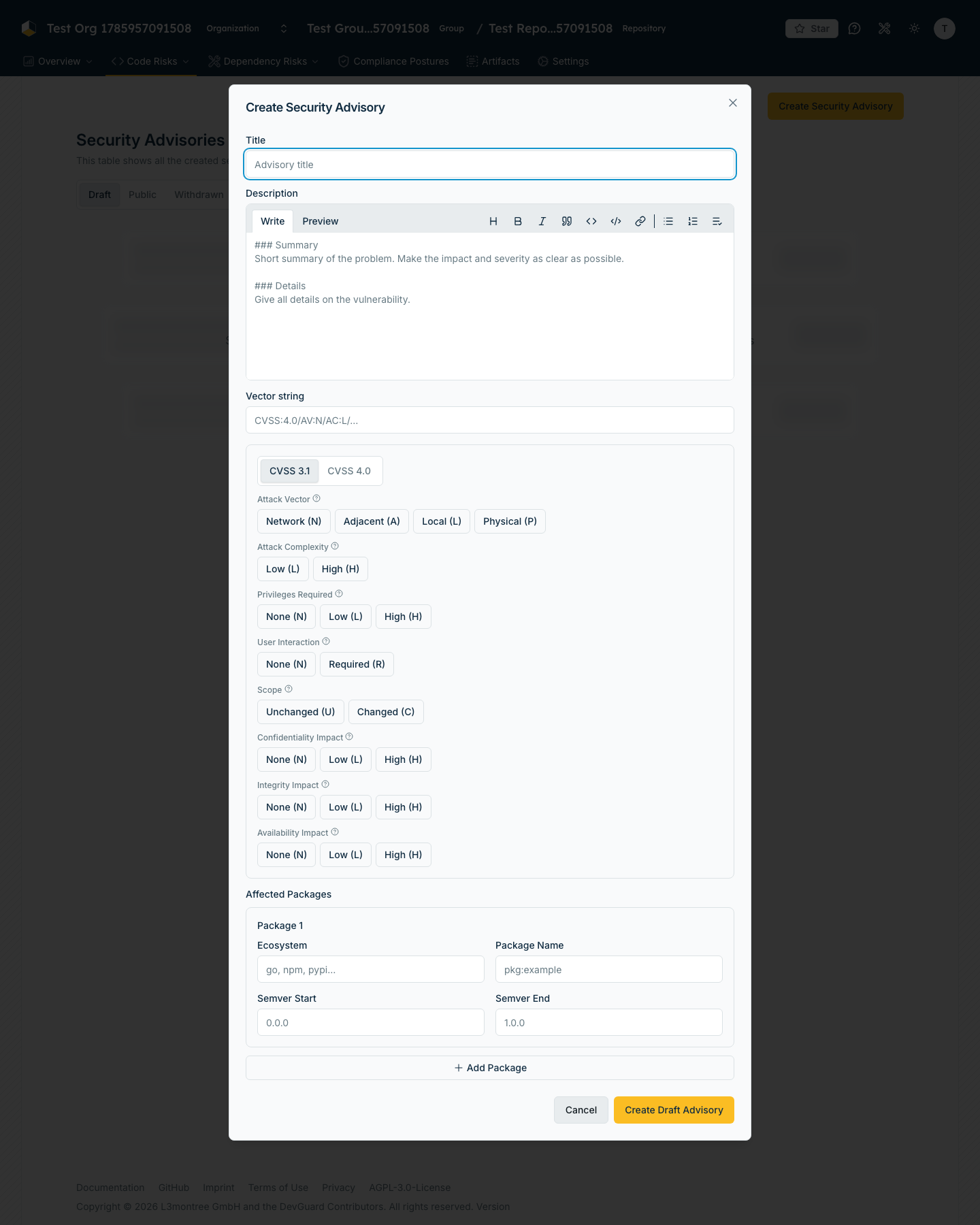
Click Create Draft Advisory to save. The new advisory appears under the Draft tab.
Manage, Publish and Withdraw
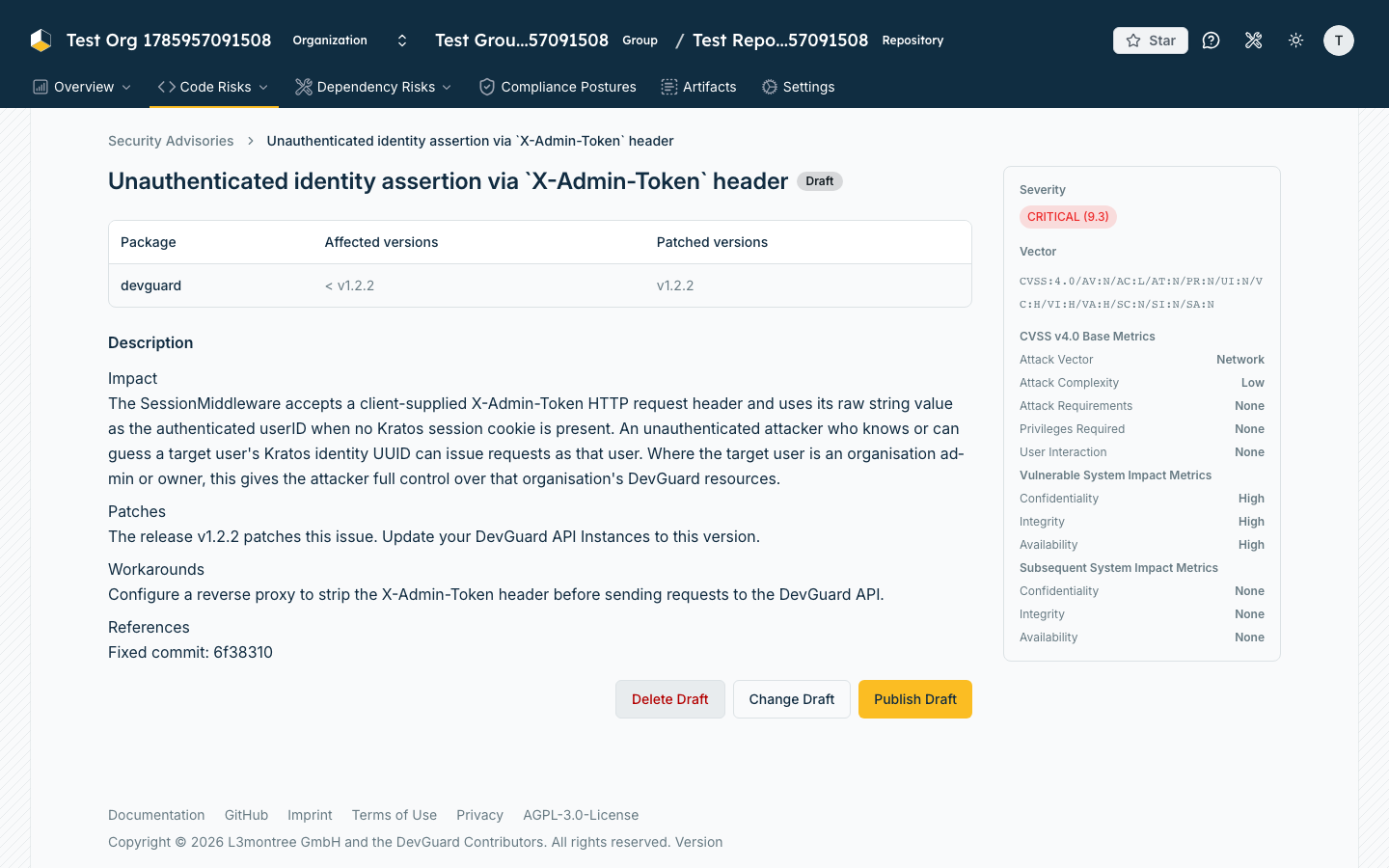
Open an advisory from the list to reach its detail page. It shows the rendered description, the affected-package table (with affected and patched version columns) and a sidebar with the severity, the CVSS vector and the individual base metrics.
The available actions depend on the current state.
Draft actions
A draft shows a Draft badge and three admin actions:
- Change Draft — reopens the dialog prefilled so you can edit any field.
- Publish Draft — makes the advisory public. After confirmation it is served through the CSAF feed and can no longer be edited.
- Delete Draft — permanently removes the draft.
Every state change asks for confirmation so you don't publish or withdraw an advisory by accident.
Published and withdrawn advisories
A published advisory carries a green Published badge and offers a single action, Withdraw Advisory. Withdrawing keeps the advisory publicly reachable — so anyone who already referenced it still finds it — but marks it as withdrawn and locks it against further changes.
How the Advisory Is Published
When you publish an advisory, DevGuard exposes it through the organization's CSAF provider tree — the same one that carries the automatically generated VEX documents. Concretely:
- The advisory receives a DevGuard identifier of the form
DGSA-<year>-<id>(DevGuard Security Advisory). - It is rendered on the fly as a canonical
csaf_security_advisoryJSON document at TLP:WHITE, with a product tree built from your affected packages,known_affectedproduct statuses and avendor_fixremediation for the patched version. - It is listed next to the CVE-based documents in the CSAF
index.txt, thechanges.csvand the per-year index — so consumers discover it automatically. - Like any CSAF document it can be fetched as plain JSON or with an OpenPGP signature (
.asc) and checksums (.sha256/.sha512).
For the full endpoint structure, aggregator and provider-metadata details, see CSAF Reports in DevGuard.
Related Documentation
- CSAF Reports in DevGuard — how advisories are distributed and consumed
- Sync External Upstream Data — ingest VEX and advisories from other providers
- Track Fix Progress — monitor remediation of detected vulnerabilities
- Customize Risk Scores — adjust risk based on your context